文件操作

一、文件的读取和写入

1
2
3
4
5
6
7
8
9
10
11
# 推荐做法 使用 with 时不需要显示 close
with open() as f:
# 文件的读写


# 手工 close
f = open('xx.txt', 'r') # 文件打开时报错不会占用资源连接
try:
# 读取文件
finally:
f.close() # 在 finally 语句块中,确保即使 open 发生异常也能正确释放

内置函数open会尝试打开文件并返回对应的文件对象,如果该文件无法打开,则会引发 OSError(具体的异常子类根据具体原因返回,例如文件不存在抛出 FileNotFoundError)。

主要参数详细说明:

  1. file (必须):

    • 表示将要打开的文件的路径(绝对路径或者相对当前工作目录的路径)
  2. mode (可选):

    • 指定打开文件的模式。详见下表“文件打开模式”。默认为 'r'
    模式 描述 注意事项
    'r' 只读 (默认) 如果文件不存在会报错 FileNotFoundError
    'w' 写入 如果文件存在,会清空原内容;不存在则创建
    'x' 排他性创建 如果文件已存在,则报错(防止覆盖重要数据)
    'a' 追加 指针在文件末尾,不会清空原内容;不存在则创建
    '+' 打开用于更新(读取与写入) 指针在文件开头
    'b' 二进制模式 用于非文本文件 (如图片、音频),可与上述模式组合 (如 'rb', 'wb')
    't' 文本模式 默认模式,通常省略不写

    'w+''w+b' 模式将打开文件并清空内容。而 'r+''r+b' 模式将打开文件但不清空内容。

  3. encoding (可选):

    • 仅文本模式使用。用于解码或编码文件的字符编码(如 'utf-8', 'gbk')。建议始终显式指定。

在使用open读写文件时,一定要使用close释放文件资源,或者使用with语句处理

不主动close可能发生的情况:

  • 数据丢失(缓存未刷新): Python 的文件操作通常是有缓冲的(Buffering)。当你调用 f.write() 时,数据可能还留在内存缓冲区中,并没有真正写入磁盘。如果你没有调用 f.close()f.flush(),且进程异常崩溃或强制终止,缓冲区中的数据可能会丢失。
  • 文件锁定(Windows 尤为明显): 在 Windows 系统上,打开的文件通常会被锁定。如果你的程序是一个长期运行的服务(比如 Web 后台),而不主动关闭文件,其他程序将无法删除或修改该文件

示例:

1
2
3
4
5
6
7
8
9
10
11
12
13
14
15
16
17
18
19
20
21
22
23
24
25
26
27
28
29
30
31
32
33
from pathlib import Path

# 检测文件是否存在
base_path = Path('test.txt')
print('before write some , is test.txt exists?', base_path.exists())

# 文件的写入
with open('test.txt', mode = 'w', encoding='utf-8') as f:
f.write('hello world\n')
f.writelines(['hello python\n', 'hello you']) # \n 控制写入以后换行

print('after write some , is test.txt exists?', base_path.exists())


# 文件的读取
with open('test.txt', mode = 'r', encoding='utf-8') as f:
for line in f.readlines():
print(line)

# 输出
before write some , is test.txt exists? False
after write some , is test.txt exists? True
hello world

hello python

hello you


# test.txt文件内容
hello world
hello python
hello you

二、文件路径

我们在进行文件的读取和写入时,需要指定文件的路径,简单文件操作,直接传入一个固定的字符串即可;但是,如果我们想要对路径做更多更复杂的事情时,就需要借助其他模块,此处介绍两个内置模块os.pathpathlib

1. os.path

此模块实现了一些有用的路径名称相关函数,下面介绍一些模块常用的API。

1.1 路径拼接与拆分

处理路径时,永远不要手动拼接字符串(如使用 +/),而应使用专用函数。

手工拼接路径,可能会由于Windows和Linux对于路径的规则不一致而引起失败

函数 描述
os.path.join(path) 路径拼接,根据当前操作系统自动插入正确的路径分隔符(\/
os.path.split(path) 将路径拆分为“目录”和“文件名”两部分,返回一个元组
os.path.splitext(path) 将路径文件名拆分为文件名和文件后缀,返回一个元组

示例:

1
2
3
4
5
6
7
8
9
10
11
12
import os.path

p = os.path.join("folder", "subfolder", "file.txt")
print(p) # Output: folder/subfolder/file.txt (on Unix-like systems) or folder\subfolder\file.txt (on Windows)

dirs, file_name = os.path.split(p)
print("Directory:", dirs) # Output: folder/subfolder
print("File Name:", file_name) # Output: file.txt

file_suffix = os.path.splitext(file_name)
print("File Name without Suffix:", file_suffix[0]) # Output: file
print("File Suffix:", file_suffix[1]) # Output: .txt

输出:

1
2
3
4
5
folder/subfolder/file.txt
Directory: folder/subfolder
File Name: file.txt
File Name without Suffix: file
File Suffix: .txt

1.2 路径属性获取

函数 描述
os.path.basename(path) 返回文件名
os.path.dirname(path) 返回目录路径
os.path.getsize(path) 返回文件大小(字节)
os.path.getmtime(path) 返回 path 的最后修改时间。返回值是一个浮点数,为纪元秒数。如果文件不存在或不可访问,抛出 OSError异常
os.path.getatime(path) 返回 path 的最后访问时间。返回值是一个浮点数,为纪元秒数。如果文件不存在或不可访问,抛出 OSError异常
os.path.getctime(path) 返回 path 在系统中的 ctime,在有些系统(比如 Unix)上,它是元数据的最后修改时间,其他系统(比如 Windows)上,它是 path 的创建时间。返回值是一个数,为纪元秒数。如果文件不存在或不可访问,抛出 OSError异常

示例:

1
2
3
4
5
6
7
8
9
10
11
import os.path

p = os.path.join("/", "usr", "lib", "os-release") # 在 Linux 系统下,如果不加最前边的 / 会认为时一个相对路径
print(p)
print('basename:', os.path.basename(p)) # Output: os-release
print('dirname:', os.path.dirname(p)) # Output: /usr/lib
print('getsize:', os.path.getsize(p)) # Output: Size of the file in bytes (if it exists)
print('getmtime:', os.path.getmtime(p)) # Output: Last modification time (if it exists)
print('getctime:', os.path.getctime(p)) # Output: Creation time (if it exists)
print('getatime:', os.path.getatime(p)) # Output: Last access time (if it exists)

输出:

1
2
3
4
5
6
7
/usr/lib/os-release
basename: os-release
dirname: /usr/lib
getsize: 400
getmtime: 1754058071.0
getctime: 1763369905.772618
getatime: 1768869259.340991

1.3 存在性与类型检查

函数 描述
os.path.exists(path) 路径是否存在(文件或文件夹均可)
os.path.isfile(path) 是否为存在的文件
os.path.isdir(path) 是否为存在的目录
os.path.isabs(path) 是否为绝对路径
os.path.islink(path) 是否为符号链接

示例:

1
2
3
4
5
6
7
8
9
10
import os.path

# 存在性与类型检查
print('exists:', os.path.exists('test.py')) # 检查文件或目录是否存在
print('isfile:', os.path.isfile('test.py')) # 检查是否为文件 true
print('isdir:', os.path.isdir('test.py')) # 检查是否为目录 false
print('isdir:', os.path.isdir('/')) # 检查是否为目录 true
print('isabs:', os.path.isabs('test.py')) # 检查是否为绝对路径 false
print('isabs:', os.path.isabs('/usr/bin')) # 检查是否为绝对路径 true
print('islink:', os.path.islink('test.py')) # 检查是否为符号链接

输出:

1
2
3
4
5
6
7
exists: True
isfile: True
isdir: False
isdir: True
isabs: False
isabs: True
islink: False

1.4 路径规范化

函数 描述
os.path.abspath(path) 将相对路径转换为绝对路径
os.path.normpath(path) 清理路径中冗余的分隔符和相对引用(如 A/B/../C 变为 A/C
os.path.realpath(path) 返回真实路径,并解析所有的符号链接(Symbolic Links)
  • .:指当前目录
  • ..:当前目录的父目录

示例:

1
2
3
4
5
6
7
8
9
10
11
12
13
import os.path

# 路径规范化
path = "folder/../folder2/file.txt"
normalized_path = os.path.normpath(path)
print(f"Normalized Path: {normalized_path}") # 输出: folder2/file.txt
# 获取绝对路径
absolute_path = os.path.abspath("file.txt")
print(f"Absolute Path: {absolute_path}") # 输出: /当前工作目录/file.txt

# realpath
real_path = os.path.realpath("file.txt")
print(f"Real Path: {real_path}") # 输出: /当前工作目录/file.txt

1.5 跨平台

函数 描述
os.path.sep 当前系统的路径分隔符(Windows 是 \,Linux 是 /
os.path.pathsep 环境变量分隔符(Windows 是 ;,Linux 是 :

示例:

1
2
3
4
5
import os.path

# 跨平台
print('sep', os.path.sep) # 路径分隔符 Linux '/'; Windows '\'
print('pathsep', os.path.pathsep) # 环境变量路径分隔符 Linux ':'; Windows ';'

2. pathlib

pathlib 是 Python 3.4+ 引入的标准库,旨在提供一种面向对象的方式来处理文件系统路径。它不仅涵盖了 os.path 的所有功能,还整合了 os 模块中关于文件操作(如创建目录、重命名等)的常用方法。

为什么选择 pathlib?

  • 面向对象: 路径不再是字符串,而是具有丰富属性和方法的对象。
  • 语法简洁: 使用 / 运算符拼接路径,替代了冗长的 os.path.join()
  • 链式操作: 可以通过 path.parent.parent 这种方式轻松获取上级目录。
  • 内置操作: 无需调用 open() 即可完成简单的文件读写。

为适用不同的操作系统,pathlib将路径类按照 纯路径具体路径 划分,其中纯路径仅提供计算操作;而具体路径是从纯路径继承而来,在提供计算操作的基础上提供了对 I/O 的操作。
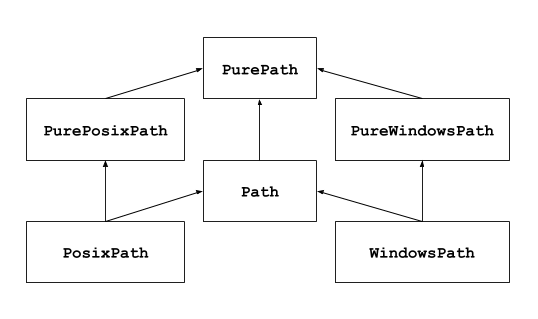
继承关系图

2.1 纯路径 (Pure Paths)

纯路径类(PurePath)只提供计算操作,不涉及实际的 I/O 操作(不访问硬盘)。你可以在 Linux 系统上定义一个 Windows 格式的纯路径,这在处理路径字符串时非常有用。

  • PurePath: 通用基类。
  • PureWindowsPath: 专门处理 Windows 风格路径(使用 \)。
  • PurePosixPath: 专门处理 Unix/Linux/macOS 风格路径(使用 /)。

2.2 具体路径 (Concrete Paths)

具体路径类(Path)继承自纯路径,除了计算功能外,还可以执行系统调用(如创建文件、检查是否存在、读取内容)。

  • Path: 最常用的类。在实例化时,它会自动根据你的操作系统生成 WindowsPathPosixPath
  • WindowsPath: Windows 系统下的具体路径。
  • PosixPath: Unix/Linux/macOS 系统下的具体路径。

注意:你不能在 Linux 上实例化 WindowsPath(会报错NotImplementedError: cannot instantiate 'WindowsPath' on your system),但你可以实例化 PureWindowsPath

上边巴拉巴拉一大堆,但是在日常使用中,基本上直接使用 from pathlib import Path就足够满足对路径的操作和操作系统的访问。

2.3 主要API

2.3.1 路径拆解与属性 (与 os.path 对标)
API (属性/方法) 描述 对应 os.path
p.name 获取完整文件名(带后缀) os.path.basename()
p.stem 获取文件名(不带后缀) os.path.splitext()[0]
p.suffix 获取文件后缀(如 .py os.path.splitext()[1]
p.suffixes 获取层级后缀列表(如 ['.tar', '.gz'] -
p.parent 获取父目录路径对象 os.path.dirname()
p.parents 获取所有上级目录的序列(迭代器), -
p.anchor 获取路径的根部分或驱动器号 -
p.parts 将路径拆分为各级目录组成的元组 -

示例:

演示路径:/home/probie/workspace/python/base-python/test.py

1
2
3
4
5
6
7
8
9
10
11
12
13
14
15
from pathlib import Path

# 路径拆解与属性
p = Path('/home/duwei/workspace/python/base-python/test.py')
print('name: ', p.name) # name: test.py
print('stem: ', p.stem) # stem: test
print('suffix: ', p.suffix) # suffix: .py
print('suffixes: ', p.suffixes) # suffixes: ['.py']
print('parent: ', p.parent) # parent: /home/duwei/workspace/python/base-python
for parent in p.parents: # parents: 逐层返回上层父级目录
print(parent)
print('parents: ', p.parents) # parents: <PosixPath.parents>
print('anchor: ', p.anchor) # anchor: /
print('parts: ', p.parts) # parts: ('/', 'home', 'duwei', 'workspace', 'python', 'base-python', 'test.py')

2.3.2 路径转换与拼接
API 描述 对应 os.path
p1 / p2 使用 / 运算符拼接路径 os.path.join()
p.joinpath(*parts) 拼接多个路径部分 os.path.join()
p.absolute() 获取绝对路径 os.path.abspath()
p.resolve() 获取真实路径(解析符号链接和 .. os.path.realpath()

特别说明:/ 运算符 vs joinpath()

两者都用于拼接,但应用场景有所不同:

  1. / 运算符

    • 语法更直观,类似于命令行中的路径表示,使用起来相对简洁且符合我们对路径的层级认识
    • 要求至少左侧的对象是一个 Path 对象
    • 跨平台适用
    • 示例Path("/usr") / "bin" / "python3"
  2. joinpath() 方法

    • 更适合动态参数,因为它接受可变参数(*args)。如果你有一个包含多个路径部分的列表或元组,使用它会更方便。
    • 示例p.joinpath(*directories_list)

示例:

1
2
3
4
5
6
7
8
9
10
11
12
13
14
from pathlib import Path

# 路径转换与拼接
base_path = Path("/home/.././probie")
print('base_path:', base_path) # base_path: .
print('absolute():', base_path.absolute())
print('resolve():', base_path.resolve())

p1 = base_path / "test.py"
print('p1:', p1)

ps = ["a", "b", "c"]
p2 = base_path.joinpath(*ps)
print('p2:', p2)

输出:

1
2
3
4
5
base_path: /home/../probie
absolute(): /home/../probie
resolve(): /probie
p1: /home/../probie/test.py
p2: /home/../probie/a/b/c
2.3.3 状态检查与查询
API 描述 对应模块
p.exists() 检查路径是否存在 os.path.exists()
p.is_file() 是否为存在的文件 os.path.isfile()
p.is_dir() 是否为存在的目录 os.path.isdir()
p.is_symlink() 是否为符号链接(软链接) os.path.islink()
p.is_absolute() 是否为绝对路径 os.path.isabs()
p.is_mount() 是否为挂载点(Unix/Linux) os.path.ismount()
p.stat() 获取文件状态(大小、修改时间等) os.stat()
p.owner() 获取文件所有者用户名 -
p.group() 获取文件所属组名 -

示例:

1
2
3
4
5
6
7
8
9
10
11
12
13
14
from pathlib import Path

# 状态检查与查询
p = Path('/usr/lib/os-release')
print('exists: ', p.exists())
print('is_file: ', p.is_file())
print('is_dir: ', p.is_dir())
print('is_symlink: ', p.is_symlink())
print('is_absolute: ', p.is_absolute())
print('is_mount: ', p.is_mount())
print('stat: ', p.stat())
print('owner: ', p.owner())
print('group: ', p.group())

输出:

1
2
3
4
5
6
7
8
9
exists:  True
is_file: True
is_dir: False
is_symlink: False
is_absolute: True
is_mount: False
stat: os.stat_result(st_mode=33188, st_ino=526106, st_dev=66313, st_nlink=1, st_uid=0, st_gid=0, st_size=400, st_atime=1768955877, st_mtime=1754058071, st_ctime=1763369905)
owner: root
group: root
2.3.4 文件系统操作
API 描述
p.mkdir(mode=0x777,parents=False, exist_ok=False) 创建目录,mode指定目录权限,parents找不到父级目录是否抛出异常,exist_ok在目录存在的情况下是否抛出异常
p.unlink() 删除文件
p.rmdir() 删除空目录
p.rename(target) 重命名文件或目录
p.touch() 创建空文件

示例:

1
2
3
4
5
6
7
8
9
10
11
12
13
14
15
16
17
18
19
20
21
22
23
24
25
26
27
28
29
30
31
from pathlib import Path

# 文件系统操作 示例
base_path = Path.cwd()
# mkdir() 创建目录
target_path = base_path / 'test'
print('before mkdir is test dir exists?', target_path.is_dir())
target_path.mkdir(mode=0x666)
# 检测 test 目录是否存在
print('after mkdir is test dir exists?', target_path.is_dir())
# 获取 test 目录的权限信息
print('test dir mode:', target_path.stat().st_mode)

# 删除 test 目录
target_path.rmdir()
# 再次检测目录是否存在
print('after rmdir is test dir exists?', target_path.is_dir())

# touch() 创建文件
f_p = base_path / 'test.txt'
f_p.touch()
# 检测文件是否存在
print('after touch is test.txt exists?', f_p.exists())
# rename() 重命名
target_path = base_path / 'test2.txt'
f_p.rename(target_path)
print('after rename is test2.txt exists?', target_path.exists())
# unlink() 删除文件
target_path.unlink()
print('after unlink is test2.txt exists?', target_path.exists())

输出:

1
2
3
4
5
6
7
before mkdir is test dir exists? False
after mkdir is test dir exists? True
test dir mode: 16996
after rmdir is test dir exists? False
after touch is test.txt exists? True
after rename is test2.txt exists? True
after unlink is test2.txt exists? False
2.3.5 路径修改
API 描述
p.with_name(name) 替换文件名和后缀
p.with_stem(stem) 替换文件名(保留原后缀)
p.with_suffix(suffix) 替换后缀名
p.with_segments(*parts) 使用给定的片段创建一个新的路径对象

对Path对象的修改,即使路径不存在也不会发生错误,因为它不会和真实的操作系统交互

示例:

1
2
3
4
5
6
7
8
9
10
11
12
13
14
15
16
17
18
19
from pathlib import Path

original = Path('/home/user/report.docx')
print(f"原始文件: {original}")

# 场景1:生成临时文件路径(改名)
temp_file = original.with_name(original.stem + "_temp" + original.suffix)
print(f"临时文件: {temp_file}") # /home/user/report_temp.docx

# 场景2:转换格式(改后缀)
pdf_version = original.with_suffix('.pdf')
print(f"PDF版本: {pdf_version}") # /home/user/report.pdf

# 场景3:只改文件名不改后缀
new_stem = original.with_stem('final_analysis')
print(f"更名后: {new_stem}") # /home/user/final_analysis.docx

# with_segments
print('创建性对象:', original.with_segments(*['/', 'tmp', 'report.xlsx']))

输出:

1
2
3
4
5
原始文件: /home/user/report.docx
临时文件: /home/user/report_temp.docx
PDF版本: /home/user/report.pdf
更名后: /home/user/final_analysis.docx
创建性对象: /tmp/report.xlsx
2.3.6 移动和复制

Python 3.14 版本添加

API 描述
Path.copy(target, follow_symlinks=True, preserve_metadata=False) 将此文件或目录树拷贝到给定的 target,并返回一个指向 target 的新的 Path 实例。
如果源文件是一个文件,则如果目标文件是一个已存在的文件,则目标文件将被替换。如果源是一个符号链接,并且 follow_symlinks 为true(默认值),则复制该符号链接的目标。否则,将在目的地重新创建符号链接。
如果 preserve_metadata 为false(默认值),则只保证复制目录结构和文件数据。将 preserve_metadata 设置为true,以确保在支持的地方复制文件和目录权限、标志、最后访问和修改时间以及扩展属性。此参数在Windows上复制文件时不起作用(会始终保留元数据)。
Path.move(target) 将此文件或目录树移动到给定的 target,并返回一个指向 target 的新的 Path 实例。
如果 target 不存在,它将被创建。 如果该路径和 target 都是现有文件,则覆盖目标。 如果两个路径都指向相同的文件或目录,或者 target 是非空目录,则引发 OSError

在操作系统和文件系统支持的情况下,copy方法执行轻量级复制,数据块仅在被修改时才会被复制。这就是所谓的写时复制。

示例:

1
2
3
4
5
6
7
8
9
10
11
12
13
14
15
16
17
from pathlib import Path

base_path = Path('test.txt')

# before copy check test_copy.txt is exists
target_path = Path('test_copy.txt')
print('before copy , is test_copy.txt exists:', target_path.exists())

# copy() 复制
base_path.copy(target_path)
print('after copy , is test_copy.txt exists:', target_path.exists())

# move() 移动
target_path = Path('test_move.txt')
base_path.move(target_path)
print('after move , is test_move.txt exists:', target_path.exists())

输出:

1
2
3
before copy , is test_copy.txt exists: False
after copy , is test_copy.txt exists: True
after move , is test_move.txt exists: True

文件 test.txt变化顺序:

  • 复制生成 test_copy.txt ,此时同时存在 test.txttest_copy.txt
  • 移动test.txt,此时生成 test_move.txt,移动后文件变为 test_copy.txttest_move.txt
2.3.7 读取目录

测试目录结构:

1
2
3
4
5
6
7
8
9
10
11
12
13
14
15
16
17
18
19
20
21
22
23
a
├── b
│ ├── c
│ │ ├── d
│ │ │ ├── a.txt
│ │ │ ├── b.log
│ │ │ └── C.py
│ │ ├── d1
│ │ ├── d1.log
│ │ ├── d2
│ │ ├── d2.txt
│ │ └── D3.py
│ ├── c1
│ ├── c1.txt
│ ├── c2
│ ├── c2.log
│ └── C2.py
├── b1
├── b1.txt
├── b2
├── b2.log
├── B3.py
└── C4.PY
API 描述
path.iterdir() 列出当前路径下的直接(不递归)目录和文件,不包括特殊条目 '.''..'
path.glob(匹配模式,case_sensitive=None) case_sensitive大小写敏感,默认按照平台规则,Windows系统不区分,使用**递归匹配
path.rglob(匹配模式,case_sensitive=None) 递归查找子目录,类似于 glob('**/xxx')
path.walk() 自上而下遍历目录树,返回一个三元组 (dirpath, dirnames, filenames);默认情况,遇到错误会忽略,可以通过on_error指定一个回调函数
dirpath 是指向当前正被遍历到的目录的Path
*dirnames存储dirpath路径下所有直接子目录的字符串名称
filenames*存储dirpath路径下所有非目录的字符串名称

iterdir示例:

1
2
3
4
5
6
7
8
9
10
11
12
13
from pathlib import Path

base_path = Path('a')
for child in base_path.iterdir():
print(child)

# 输出
a/b2
a/b
a/b1
a/b1.txt
a/B3.py
a/b2.log

glob示例:

1
2
3
4
5
6
7
8
9
10
11
12
13
14
15
from pathlib import Path

base_path = Path('a')

# 不递归子目录,大小写依赖平台默认
py_files = base_path.glob('*.py')
print(list(py_files)) # B3.py

# 不递归子目录,大小写不依赖平台
py_files = base_path.glob('*.py', case_sensitive=False)
print(list(py_files)) # B3.py C4.PY

# 递归子目录,大小写依赖平台默认
py_files = base_path.glob('**/*.py')
print(list(py_files)) # a/B3.py a/b/C2.py a/b/c/D3.py a/b/c/d/C.py

rglob示例:

1
2
3
4
5
6
7
8
9
10
11
12
13
14
from pathlib import Path

base_path = Path('a')

# 递归子目录,大小写不敏感
for file in base_path.rglob('*.py', case_sensitive=False):
print(file)

# 输出
a/B3.py
a/C4.PY
a/b/C2.py
a/b/c/D3.py
a/b/c/d/C.py

walk示例:

1
2
3
4
5
6
7
8
9
10
11
12
13
14
15
16
17
18
19
from pathlib import Path

base_path = Path('a')

# walk
for dirpath, dirnames, filenames in base_path.walk():
print(dirpath, dirnames, filenames)

# 输出
a ['b2', 'b', 'b1'] ['b1.txt', 'B3.py', 'C4.PY', 'b2.log']
a/b2 [] []
a/b ['c', 'c1', 'c2'] ['c2.log', 'C2.py', 'c1.txt']
a/b/c ['d', 'd2', 'd1'] ['d1.log', 'D3.py', 'd2.txt']
a/b/c/d [] ['C.py', 'b.log', 'a.txt']
a/b/c/d2 [] []
a/b/c/d1 [] []
a/b/c1 [] []
a/b/c2 [] []
a/b1 [] []

3. 对比

pathlib模块中涵盖了 osos.path 的大部分核心功能,但它们并非完全的替代关系。那么在实际项目开发中,我们应该如何选择呢?

  • 新项目,对于路径的操作优先选择 pathlib,使用 from pathlib import Path,涉及到底层os级别的,pathlib未提供的用os处理路径之外的系统交互
  • 已有项目兼容,Path 对象转字符串:直接调用 str(path_obj)字符串转 Path 对象:直接 Path(str_path)

pathlibosos.path模块功能的映射表:

osos.path pathlib
os.path.dirname() PurePath.parent
os.path.basename() PurePath.name
os.path.splitext() PurePath.stem, PurePath.suffix
os.path.join() PurePath.joinpath()
os.path.isabs() PurePath.is_absolute()
os.path.relpath() PurePath.relative_to()
os.path.expanduser() Path.expanduser()
os.path.realpath() Path.resolve()
os.path.abspath() Path.absolute()
os.path.exists() Path.exists()
os.path.isfile() Path.is_file()
os.path.isdir() Path.is_dir()
os.path.islink() Path.is_symlink()
os.path.isjunction() Path.is_junction()
os.path.ismount() Path.is_mount()
os.path.samefile() Path.samefile()
os.getcwd() Path.cwd()
os.stat() Path.stat()
os.lstat() Path.lstat()
os.listdir() Path.iterdir()
os.walk() Path.walk()
os.mkdir(), os.makedirs() Path.mkdir()
os.link() Path.hardlink_to()
os.symlink() Path.symlink_to()
os.readlink() Path.readlink()
os.rename() Path.rename()
os.replace() Path.replace()
os.remove(), os.unlink() Path.unlink()
os.rmdir() Path.rmdir()
os.chmod() Path.chmod()
os.lchmod() Path.lchmod()